
备注
Go to the end to download the full example code..
复选按钮#
使用复选按钮打开和关闭视觉元素.
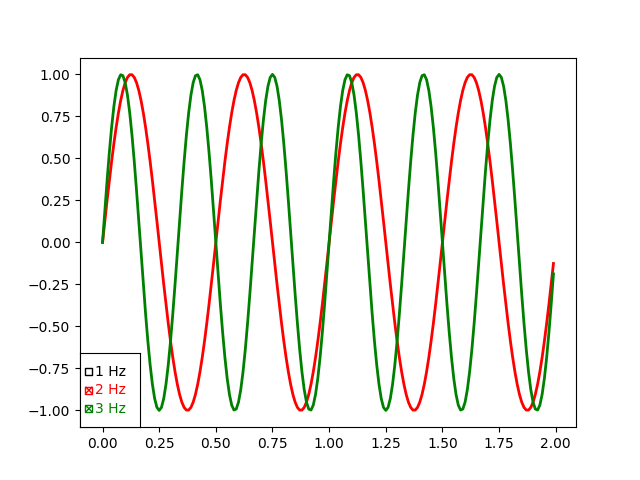
此程序说明了 CheckButtons 的用法,它类似于复选框.显示了 3 个不同的正弦波,我们可以使用复选按钮选择显示哪些波.
可以使用 check_props,frame_props 和 label_props 参数来设置复选按钮的样式.这些参数各自接受一个字典,其中包含艺术家属性名称的键和与按钮数量匹配的设置列表的值.
import matplotlib.pyplot as plt
import numpy as np

from matplotlib.widgets import CheckButtons

t = np.arange(0.0, 2.0, 0.01)
s0 = np.sin(2*np.pi*t)
s1 = np.sin(4*np.pi*t)
s2 = np.sin(6*np.pi*t)

fig, ax = plt.subplots()
l0, = ax.plot(t, s0, visible=False, lw=2, color='black', label='1 Hz')
l1, = ax.plot(t, s1, lw=2, color='red', label='2 Hz')
l2, = ax.plot(t, s2, lw=2, color='green', label='3 Hz')

lines_by_label = {l.get_label(): l for l in [l0, l1, l2]}
line_colors = [l.get_color() for l in lines_by_label.values()]

# Make checkbuttons with all plotted lines with correct visibility
rax = ax.inset_axes([0.0, 0.0, 0.12, 0.2])
check = CheckButtons(
    ax=rax,
    labels=lines_by_label.keys(),
    actives=[l.get_visible() for l in lines_by_label.values()],
    label_props={'color': line_colors},
    frame_props={'edgecolor': line_colors},
    check_props={'facecolor': line_colors},
)


def callback(label):
    ln = lines_by_label[label]
    ln.set_visible(not ln.get_visible())
    ln.figure.canvas.draw_idle()

check.on_clicked(callback)

plt.show()
参考
以下函数,方法,类和模块的用法在本例中显示:
matplotlib.widgets.CheckButtons