
备注
Go to the end 下载完整示例代码.
嵌套饼图#
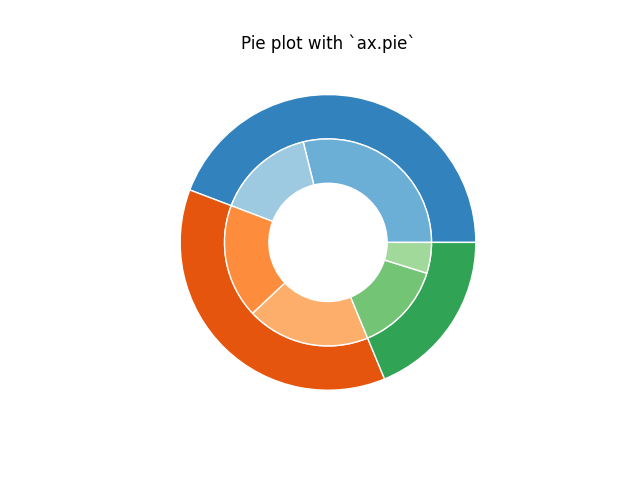
以下示例显示了在 Matplotlib 中构建嵌套饼图的两种方法.此类图表通常称为环形图.
另请参阅 左心室牛眼图 示例.
import matplotlib.pyplot as plt
import numpy as np
构建饼图最直接的方法是使用 pie 方法.
在这种情况下,pie 采用与组中的计数相对应的值.我们将首先生成一些假数据,对应于三个组.在内圆中,我们将每个数字视为属于其自己的组.在外圆中,我们将它们绘制为其原始 3 个组的成员.
通过 wedgeprops 参数为饼图的楔形设置一个 width 来实现环形形状的效果.
fig, ax = plt.subplots()

size = 0.3
vals = np.array([[60., 32.], [37., 40.], [29., 10.]])

tab20c = plt.color_sequences["tab20c"]
outer_colors = [tab20c[i] for i in [0, 4, 8]]
inner_colors = [tab20c[i] for i in [1, 2, 5, 6, 9, 10]]

ax.pie(vals.sum(axis=1), radius=1, colors=outer_colors,
       wedgeprops=dict(width=size, edgecolor='w'))

ax.pie(vals.flatten(), radius=1-size, colors=inner_colors,
       wedgeprops=dict(width=size, edgecolor='w'))

ax.set(aspect="equal", title='Pie plot with `ax.pie`')
plt.show()
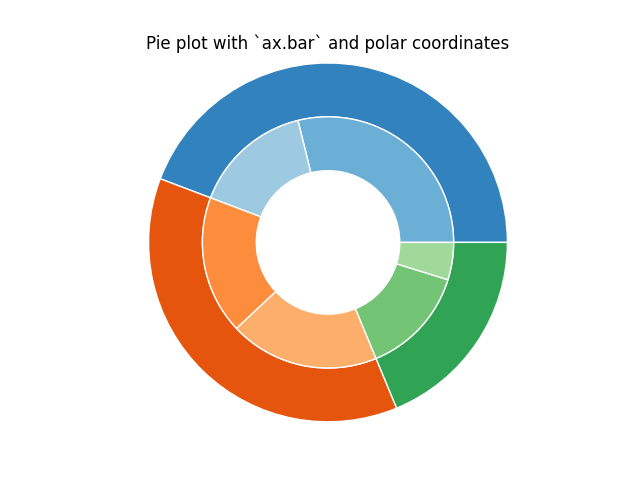
但是,您可以通过在具有极坐标系的 Axes 上使用条形图来实现相同的输出.这可以为图的确切设计提供更大的灵活性.
在这种情况下,我们需要将条形图的 x 值映射到圆的弧度.这些值的累积和用作条的边缘.
fig, ax = plt.subplots(subplot_kw=dict(projection="polar"))

size = 0.3
vals = np.array([[60., 32.], [37., 40.], [29., 10.]])
# Normalize vals to 2 pi
valsnorm = vals/np.sum(vals)*2*np.pi
# Obtain the ordinates of the bar edges
valsleft = np.cumsum(np.append(0, valsnorm.flatten()[:-1])).reshape(vals.shape)

cmap = plt.colormaps["tab20c"]
outer_colors = cmap(np.arange(3)*4)
inner_colors = cmap([1, 2, 5, 6, 9, 10])

ax.bar(x=valsleft[:, 0],
       width=valsnorm.sum(axis=1), bottom=1-size, height=size,
       color=outer_colors, edgecolor='w', linewidth=1, align="edge")

ax.bar(x=valsleft.flatten(),
       width=valsnorm.flatten(), bottom=1-2*size, height=size,
       color=inner_colors, edgecolor='w', linewidth=1, align="edge")

ax.set(title="Pie plot with `ax.bar` and polar coordinates")
ax.set_axis_off()
plt.show()
参考
以下函数,方法,类和模块的用法在本例中显示:
matplotlib.axes.Axes.pie/matplotlib.pyplot.piematplotlib.axes.Axes.bar/matplotlib.pyplot.barmatplotlib.projections.polarAxes.set(matplotlib.artist.Artist.set)matplotlib.axes.Axes.set_axis_off