
备注
Go to the end 下载完整示例代码..
数据坐标系中的文本旋转角度#
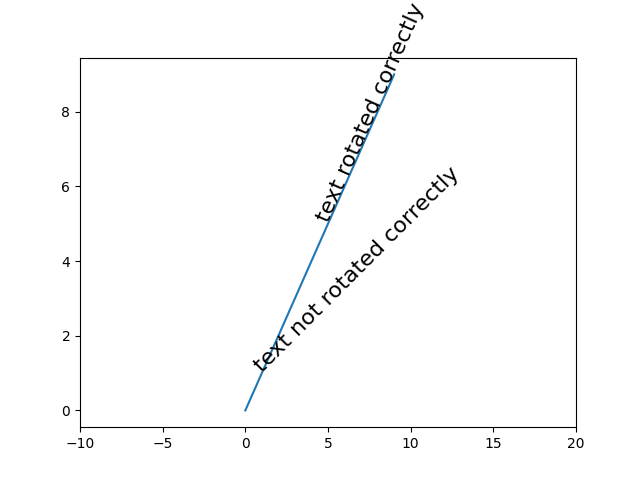
matplotlib 中的文本对象通常相对于屏幕坐标系旋转(即,45 度旋转沿水平和垂直之间的线绘制文本,无论如何更改轴).但是,有时人们希望相对于图中的某些内容旋转文本.在这种情况下,正确的角度将不是该对象在绘图坐标系中的角度,而是该对象在屏幕坐标系中"显示"的角度.可以通过设置参数 transform_rotates_text 自动确定此角度,如下例所示.
import matplotlib.pyplot as plt
import numpy as np

fig, ax = plt.subplots()

# Plot diagonal line (45 degrees)
h = ax.plot(range(0, 10), range(0, 10))

# set limits so that it no longer looks on screen to be 45 degrees
ax.set_xlim([-10, 20])

# Locations to plot text
l1 = np.array((1, 1))
l2 = np.array((5, 5))

# Rotate angle
angle = 45

# Plot text
th1 = ax.text(*l1, 'text not rotated correctly', fontsize=16,
              rotation=angle, rotation_mode='anchor')
th2 = ax.text(*l2, 'text rotated correctly', fontsize=16,
              rotation=angle, rotation_mode='anchor',
              transform_rotates_text=True)

plt.show()