
备注
Go to the end 下载完整的示例代码...
阴影演示#
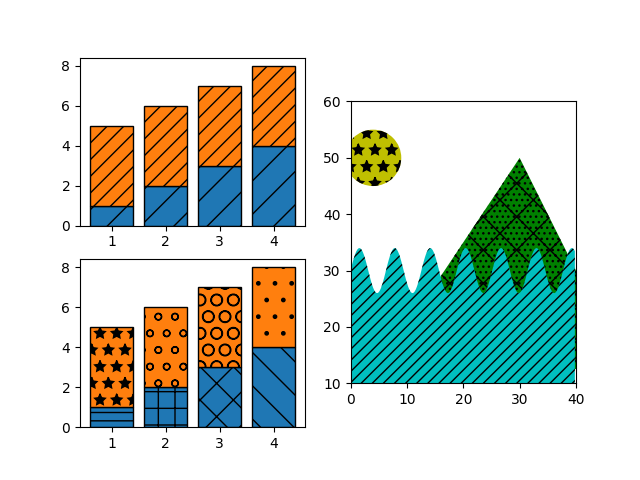
阴影可以添加到 Matplotlib 中的大多数多边形,包括 bar , fill_between , contourf 和 Polygon 的子项.目前 PS,PDF,SVG,macosx 和 Agg 后端支持阴影.WX 和 Cairo 后端目前不支持阴影.
另请参见 Contourf 填充图案 ,其中包含使用 contourf 的示例,以及 阴影样式参考 ,其中包含现有阴影的色板.
import matplotlib.pyplot as plt
import numpy as np

from matplotlib.patches import Ellipse, Polygon

x = np.arange(1, 5)
y1 = np.arange(1, 5)
y2 = np.ones(y1.shape) * 4

fig = plt.figure()
axs = fig.subplot_mosaic([['bar1', 'patches'], ['bar2', 'patches']])

axs['bar1'].bar(x, y1, edgecolor='black', hatch="/")
axs['bar1'].bar(x, y2, bottom=y1, edgecolor='black', hatch='//')

axs['bar2'].bar(x, y1, edgecolor='black', hatch=['--', '+', 'x', '\\'])
axs['bar2'].bar(x, y2, bottom=y1, edgecolor='black',
                hatch=['*', 'o', 'O', '.'])

x = np.arange(0, 40, 0.2)
axs['patches'].fill_between(x, np.sin(x) * 4 + 30, y2=0,
                            hatch='///', zorder=2, fc='c')
axs['patches'].add_patch(Ellipse((4, 50), 10, 10, fill=True,
                                 hatch='*', facecolor='y'))
axs['patches'].add_patch(Polygon([(10, 20), (30, 50), (50, 10)],
                                 hatch='\\/...', facecolor='g'))
axs['patches'].set_xlim([0, 40])
axs['patches'].set_ylim([10, 60])
axs['patches'].set_aspect(1)
plt.show()
参考
以下函数,方法,类和模块的用法在本例中显示:
matplotlib.patchesmatplotlib.patches.Ellipsematplotlib.patches.Polygonmatplotlib.axes.Axes.add_patchmatplotlib.patches.Patch.set_hatchmatplotlib.axes.Axes.bar/matplotlib.pyplot.bar