
备注
Go to the end 以下载完整的示例代码.
fill_between 带透明度#
fill_between 函数生成一个介于最小和最大边界之间的阴影区域,该区域可用于说明范围. 它有一个非常方便的 where 参数,可以将填充与逻辑范围组合起来,例如,仅填充超过某个阈值的曲线.
在其最基本的层面上, fill_between 可用于增强图形的视觉外观. 让我们比较两张财务数据图,左侧是简单的折线图,右侧是填充的折线图.
import matplotlib.pyplot as plt
import numpy as np

import matplotlib.cbook as cbook

# load up some sample financial data
r = cbook.get_sample_data('goog.npz')['price_data']
# create two subplots with the shared x and y axes
fig, (ax1, ax2) = plt.subplots(1, 2, sharex=True, sharey=True)

pricemin = r["close"].min()

ax1.plot(r["date"], r["close"], lw=2)
ax2.fill_between(r["date"], pricemin, r["close"], alpha=0.7)

for ax in ax1, ax2:
    ax.grid(True)
    ax.label_outer()

ax1.set_ylabel('price')

fig.suptitle('Google (GOOG) daily closing price')
fig.autofmt_xdate()
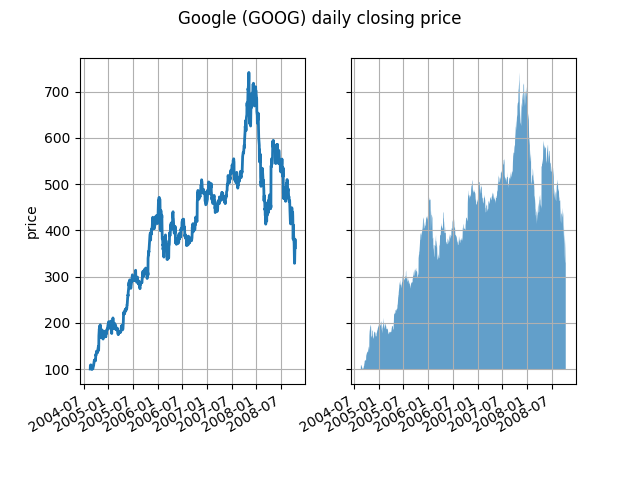
alpha 通道在这里不是必需的,但它可以用于柔化颜色,以获得更具视觉吸引力的绘图. 在其他示例中,正如我们将在下面看到的那样,alpha 通道在功能上很有用,因为阴影区域可以重叠,并且 alpha 允许您同时看到两者. 请注意,postscript 格式不支持 alpha(这是 postscript 的限制,而不是 matplotlib 的限制),因此在使用 alpha 时,请将图形保存为 PNG,PDF 或 SVG.
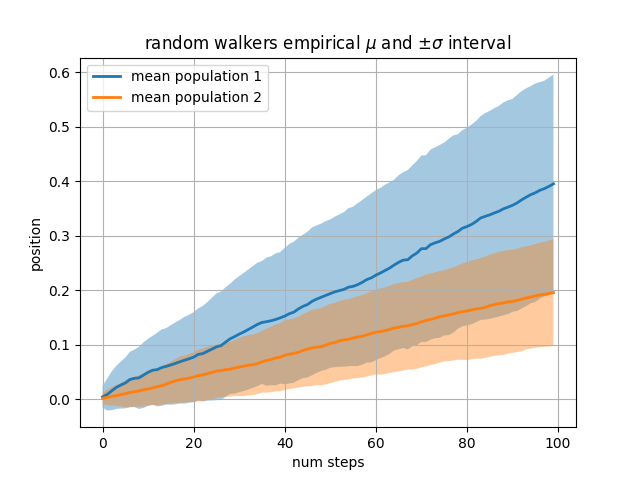
我们的下一个例子计算两组随机游走者,它们来自正态分布的步长的均值和标准差不同.我们使用填充区域来绘制人群平均位置的正负一个标准差.这里,alpha 通道不仅美观,而且非常有用.
# Fixing random state for reproducibility
np.random.seed(19680801)

Nsteps, Nwalkers = 100, 250
t = np.arange(Nsteps)

# an (Nsteps x Nwalkers) array of random walk steps
S1 = 0.004 + 0.02*np.random.randn(Nsteps, Nwalkers)
S2 = 0.002 + 0.01*np.random.randn(Nsteps, Nwalkers)

# an (Nsteps x Nwalkers) array of random walker positions
X1 = S1.cumsum(axis=0)
X2 = S2.cumsum(axis=0)


# Nsteps length arrays empirical means and standard deviations of both
# populations over time
mu1 = X1.mean(axis=1)
sigma1 = X1.std(axis=1)
mu2 = X2.mean(axis=1)
sigma2 = X2.std(axis=1)

# plot it!
fig, ax = plt.subplots(1)
ax.plot(t, mu1, lw=2, label='mean population 1')
ax.plot(t, mu2, lw=2, label='mean population 2')
ax.fill_between(t, mu1+sigma1, mu1-sigma1, facecolor='C0', alpha=0.4)
ax.fill_between(t, mu2+sigma2, mu2-sigma2, facecolor='C1', alpha=0.4)
ax.set_title(r'random walkers empirical $\mu$ and $\pm \sigma$ interval')
ax.legend(loc='upper left')
ax.set_xlabel('num steps')
ax.set_ylabel('position')
ax.grid()
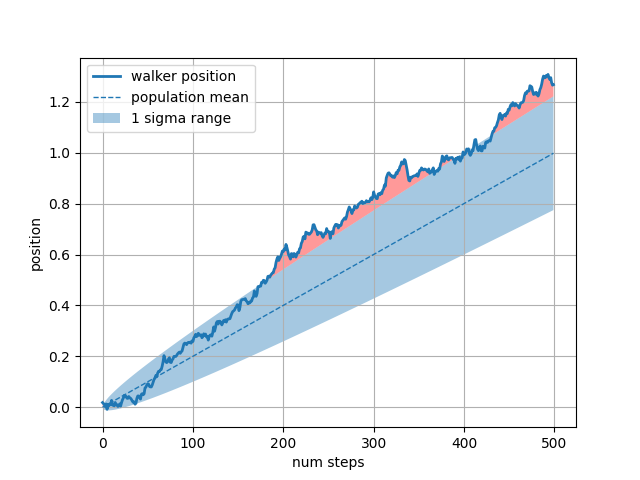
where 关键字参数对于突出显示图表的某些区域非常方便. where 接受一个布尔掩码,该掩码与 x,ymin 和 ymax 参数的长度相同,并且仅填充布尔掩码为 True 的区域.在下面的示例中,我们模拟一个随机游走者,并计算人群位置的解析均值和标准差.人群均值显示为虚线,正负一个标准差与均值的偏差显示为填充区域.我们使用 where 掩码 X > upper_bound 来查找游走者超出一个标准差边界的区域,并将该区域涂成红色.
# Fixing random state for reproducibility
np.random.seed(1)

Nsteps = 500
t = np.arange(Nsteps)

mu = 0.002
sigma = 0.01

# the steps and position
S = mu + sigma*np.random.randn(Nsteps)
X = S.cumsum()

# the 1 sigma upper and lower analytic population bounds
lower_bound = mu*t - sigma*np.sqrt(t)
upper_bound = mu*t + sigma*np.sqrt(t)

fig, ax = plt.subplots(1)
ax.plot(t, X, lw=2, label='walker position')
ax.plot(t, mu*t, lw=1, label='population mean', color='C0', ls='--')
ax.fill_between(t, lower_bound, upper_bound, facecolor='C0', alpha=0.4,
                label='1 sigma range')
ax.legend(loc='upper left')

# here we use the where argument to only fill the region where the
# walker is above the population 1 sigma boundary
ax.fill_between(t, upper_bound, X, where=X > upper_bound, fc='red', alpha=0.4)
ax.fill_between(t, lower_bound, X, where=X < lower_bound, fc='red', alpha=0.4)
ax.set_xlabel('num steps')
ax.set_ylabel('position')
ax.grid()
填充区域的另一个方便的用途是突出显示 Axes 的水平或垂直跨度 -- Matplotlib 为此提供了辅助函数 axhspan 和 axvspan .请参阅 绘制跨越轴的区域 .
plt.show()