
备注
Go to the end 下载完整示例代码.
带有标签的饼图和甜甜圈图#
欢迎来到 Matplotlib 面包店.我们将通过 pie 方法 创建一个饼图和一个甜甜圈图,并展示如何使用 图例 以及 注释 标记它们.
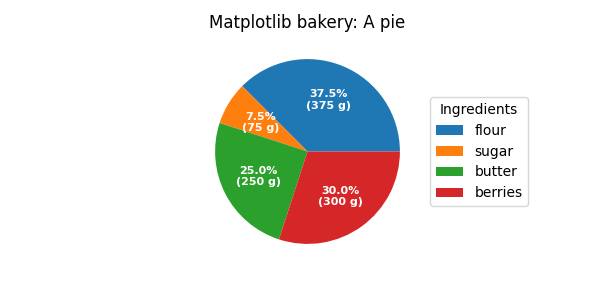
通常,我们首先会定义导入项并创建一个包含子图的图形.现在是制作饼图的时候了.从一个饼图配方开始,我们创建数据并从中创建一个标签列表.
我们可以为 autopct 参数提供一个函数,它将通过显示绝对值来扩展自动百分比标签;我们从相对数据和所有值的已知总和反向计算后者.
然后,我们创建饼图并存储返回的对象以供后续使用.返回元组的第一个返回元素是楔形列表.这些是 matplotlib.patches.Wedge patch,可以直接用作图例的句柄.我们可以使用图例的 bbox_to_anchor 参数将图例放置在饼图之外.这里我们使用轴坐标 (1, 0, 0.5, 1) 以及位置 "center left" ;即图例的左中心点将位于边界框的左中心点,在轴坐标中从 (1, 0) 跨越到 (1.5, 1) .
import matplotlib.pyplot as plt
import numpy as np

fig, ax = plt.subplots(figsize=(6, 3), subplot_kw=dict(aspect="equal"))

recipe = ["375 g flour",
          "75 g sugar",
          "250 g butter",
          "300 g berries"]

data = [float(x.split()[0]) for x in recipe]
ingredients = [x.split()[-1] for x in recipe]


def func(pct, allvals):
    absolute = int(np.round(pct/100.*np.sum(allvals)))
    return f"{pct:.1f}%\n({absolute:d} g)"


wedges, texts, autotexts = ax.pie(data, autopct=lambda pct: func(pct, data),
                                  textprops=dict(color="w"))

ax.legend(wedges, ingredients,
          title="Ingredients",
          loc="center left",
          bbox_to_anchor=(1, 0, 0.5, 1))

plt.setp(autotexts, size=8, weight="bold")

ax.set_title("Matplotlib bakery: A pie")

plt.show()
现在是制作甜甜圈的时候了.从一个甜甜圈配方开始,我们将数据转录为数字(将 1 个鸡蛋转换为 50 克),并直接绘制饼图.饼图?等等...它会是甜甜圈,不是吗?嗯,正如我们在这里看到的,甜甜圈是一个饼图,楔形具有一定的 width ,这与其半径不同.这非常容易实现.这是通过 wedgeprops 参数完成的.
然后,我们希望通过 annotations 来标记楔形.我们首先创建一些常见属性的字典,稍后我们可以将其作为关键字参数传递.然后,我们遍历所有楔形,并为每个楔形
计算楔形中心的角度,
由此获得圆周上该角度的点的坐标,
根据点位于圆的哪一侧,确定文本的水平对齐方式,
使用获得的角度更新连接样式,以使注释箭头从甜甜圈向外指出,
最后,使用所有先前确定的参数创建注释.
fig, ax = plt.subplots(figsize=(6, 3), subplot_kw=dict(aspect="equal"))

recipe = ["225 g flour",
          "90 g sugar",
          "1 egg",
          "60 g butter",
          "100 ml milk",
          "1/2 package of yeast"]

data = [225, 90, 50, 60, 100, 5]

wedges, texts = ax.pie(data, wedgeprops=dict(width=0.5), startangle=-40)

bbox_props = dict(boxstyle="square,pad=0.3", fc="w", ec="k", lw=0.72)
kw = dict(arrowprops=dict(arrowstyle="-"),
          bbox=bbox_props, zorder=0, va="center")

for i, p in enumerate(wedges):
    ang = (p.theta2 - p.theta1)/2. + p.theta1
    y = np.sin(np.deg2rad(ang))
    x = np.cos(np.deg2rad(ang))
    horizontalalignment = {-1: "right", 1: "left"}[int(np.sign(x))]
    connectionstyle = f"angle,angleA=0,angleB={ang}"
    kw["arrowprops"].update({"connectionstyle": connectionstyle})
    ax.annotate(recipe[i], xy=(x, y), xytext=(1.35*np.sign(x), 1.4*y),
                horizontalalignment=horizontalalignment, **kw)

ax.set_title("Matplotlib bakery: A donut")

plt.show()
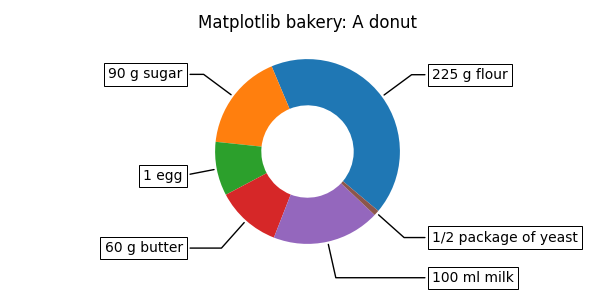
这就是甜甜圈.但请注意,如果要使用此配方,这些成分足以制作大约 6 个甜甜圈 - 生产一个巨大的甜甜圈未经测试,可能会导致厨房错误.
参考
以下函数,方法,类和模块的用法在本例中显示:
matplotlib.axes.Axes.pie/matplotlib.pyplot.piematplotlib.axes.Axes.legend/matplotlib.pyplot.legend