备注
Go to the end 下载完整的示例代码.
3D图投影类型#
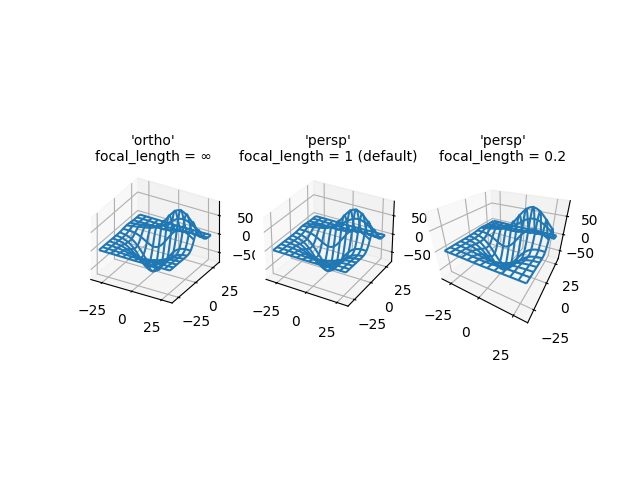
演示了3D图的不同相机投影,以及更改透视投影焦距的效果. 请注意,Matplotlib 会校正更改焦距的"缩放"效果.
默认焦距 1 对应于 90 度的视野 (FOV). 介于 1 和无穷大之间的增加的焦距会"展平"图像,而介于 1 和 0 之间的减小的焦距会夸大透视效果,并使图像具有更明显的深度. 在限制情况下,无穷大的焦距对应于校正缩放效果后的正交投影.
您可以通过以下公式从 FOV 计算焦距:
\[1 / \tan (\mathrm{FOV} / 2)\]
反之亦然:
\[\mathrm{FOV} = 2 \arctan (1 / \mathrm{focal length})\]
import matplotlib.pyplot as plt

from mpl_toolkits.mplot3d import axes3d

fig, axs = plt.subplots(1, 3, subplot_kw={'projection': '3d'})

# Get the test data
X, Y, Z = axes3d.get_test_data(0.05)

# Plot the data
for ax in axs:
    ax.plot_wireframe(X, Y, Z, rstride=10, cstride=10)

# Set the orthographic projection.
axs[0].set_proj_type('ortho')  # FOV = 0 deg
axs[0].set_title("'ortho'\nfocal_length = ∞", fontsize=10)

# Set the perspective projections
axs[1].set_proj_type('persp')  # FOV = 90 deg
axs[1].set_title("'persp'\nfocal_length = 1 (default)", fontsize=10)

axs[2].set_proj_type('persp', focal_length=0.2)  # FOV = 157.4 deg
axs[2].set_title("'persp'\nfocal_length = 0.2", fontsize=10)

plt.show()