
备注
Go to the end 下载完整示例代码.
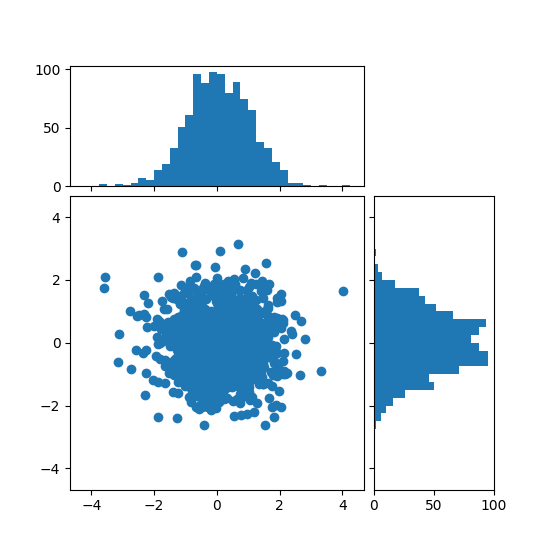
使用可定位的 Axes 将直方图与散点图对齐#
在绘图侧面显示散点图的边际分布,作为直方图.
为了使主 Axes 与边际对齐,Axes 位置由一个 Divider 定义,该 Divider 通过 make_axes_locatable 生成.请注意, Divider API 允许以英寸为单位设置 Axes 大小和pad,这是其主要特性.
如果想要设置相对于主 Figure 的 Axes 大小和pad,请参见 带有直方图的散点图 示例.
import matplotlib.pyplot as plt
import numpy as np

from mpl_toolkits.axes_grid1 import make_axes_locatable

# Fixing random state for reproducibility
np.random.seed(19680801)

# the random data
x = np.random.randn(1000)
y = np.random.randn(1000)


fig, ax = plt.subplots(figsize=(5.5, 5.5))

# the scatter plot:
ax.scatter(x, y)

# Set aspect of the main Axes.
ax.set_aspect(1.)

# create new Axes on the right and on the top of the current Axes
divider = make_axes_locatable(ax)
# below height and pad are in inches
ax_histx = divider.append_axes("top", 1.2, pad=0.1, sharex=ax)
ax_histy = divider.append_axes("right", 1.2, pad=0.1, sharey=ax)

# make some labels invisible
ax_histx.xaxis.set_tick_params(labelbottom=False)
ax_histy.yaxis.set_tick_params(labelleft=False)

# now determine nice limits by hand:
binwidth = 0.25
xymax = max(np.max(np.abs(x)), np.max(np.abs(y)))
lim = (int(xymax/binwidth) + 1)*binwidth

bins = np.arange(-lim, lim + binwidth, binwidth)
ax_histx.hist(x, bins=bins)
ax_histy.hist(y, bins=bins, orientation='horizontal')

# the xaxis of ax_histx and yaxis of ax_histy are shared with ax,
# thus there is no need to manually adjust the xlim and ylim of these
# axis.

ax_histx.set_yticks([0, 50, 100])
ax_histy.set_xticks([0, 50, 100])

plt.show()
参考
以下函数,方法,类和模块的用法在本例中显示:
mpl_toolkits.axes_grid1.axes_divider.make_axes_locatablematplotlib.axes.Axes.set_aspectmatplotlib.axes.Axes.scattermatplotlib.axes.Axes.hist