备注
Go to the end 下载完整示例代码.
线条样式#
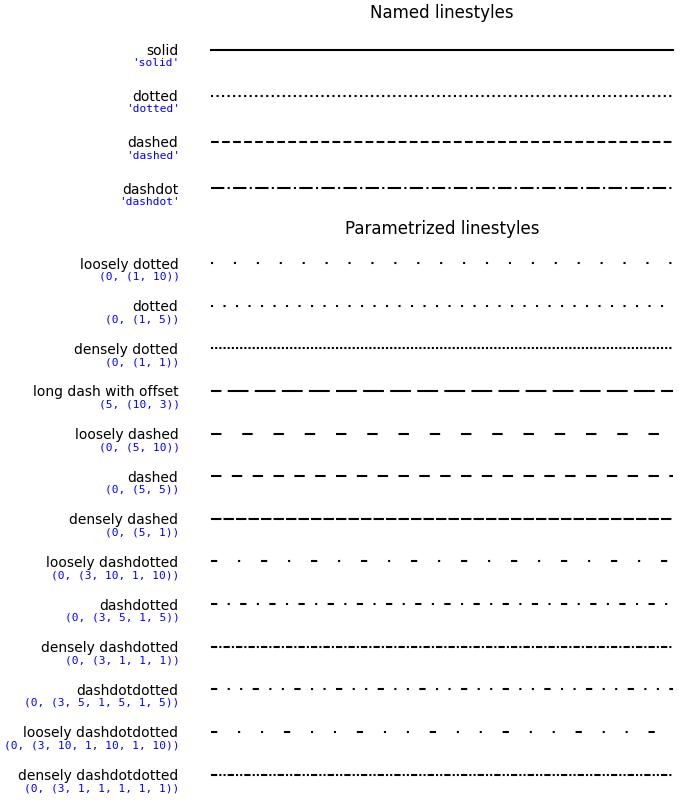
可以使用字符串"solid","dotted","dashed"或"dashdot"定义简单的线条样式.可以通过提供虚线元组 (offset, (on_off_seq)) 来实现更精细的控制.例如, (0, (3, 10, 1, 15)) 表示(3pt 线,10pt 间距,1pt 线,15pt 间距),没有偏移,而 (5, (10, 3)) 表示(10pt 线,3pt 间距),但跳过前 5pt 线.另请参阅 Line2D.set_linestyle ."dotted","dashed"和"dashdot"样式的特定开/关序列是可配置的:
rcParams["lines.dotted_pattern"](default:[1.0, 1.65])rcParams["lines.dashed_pattern"](default:[3.7, 1.6])rcParams["lines.dashdot_pattern"](default:[6.4, 1.6, 1.0, 1.6])
注意:虚线样式也可以通过 Line2D.set_dashes 配置,如 虚线样式配置 中所示,并且可以使用关键字 dashes 将虚线序列列表传递给 property_cycle 中的 cycler.
import matplotlib.pyplot as plt
import numpy as np

linestyle_str = [
     ('solid', 'solid'),      # Same as (0, ()) or '-'
     ('dotted', 'dotted'),    # Same as ':'
     ('dashed', 'dashed'),    # Same as '--'
     ('dashdot', 'dashdot')]  # Same as '-.'

linestyle_tuple = [
     ('loosely dotted',        (0, (1, 10))),
     ('dotted',                (0, (1, 5))),
     ('densely dotted',        (0, (1, 1))),

     ('long dash with offset', (5, (10, 3))),
     ('loosely dashed',        (0, (5, 10))),
     ('dashed',                (0, (5, 5))),
     ('densely dashed',        (0, (5, 1))),

     ('loosely dashdotted',    (0, (3, 10, 1, 10))),
     ('dashdotted',            (0, (3, 5, 1, 5))),
     ('densely dashdotted',    (0, (3, 1, 1, 1))),

     ('dashdotdotted',         (0, (3, 5, 1, 5, 1, 5))),
     ('loosely dashdotdotted', (0, (3, 10, 1, 10, 1, 10))),
     ('densely dashdotdotted', (0, (3, 1, 1, 1, 1, 1)))]


def plot_linestyles(ax, linestyles, title):
    X, Y = np.linspace(0, 100, 10), np.zeros(10)
    yticklabels = []

    for i, (name, linestyle) in enumerate(linestyles):
        ax.plot(X, Y+i, linestyle=linestyle, linewidth=1.5, color='black')
        yticklabels.append(name)

    ax.set_title(title)
    ax.set(ylim=(-0.5, len(linestyles)-0.5),
           yticks=np.arange(len(linestyles)),
           yticklabels=yticklabels)
    ax.tick_params(left=False, bottom=False, labelbottom=False)
    ax.spines[:].set_visible(False)

    # For each line style, add a text annotation with a small offset from
    # the reference point (0 in Axes coords, y tick value in Data coords).
    for i, (name, linestyle) in enumerate(linestyles):
        ax.annotate(repr(linestyle),
                    xy=(0.0, i), xycoords=ax.get_yaxis_transform(),
                    xytext=(-6, -12), textcoords='offset points',
                    color="blue", fontsize=8, ha="right", family="monospace")


fig, (ax0, ax1) = plt.subplots(2, 1, figsize=(7, 8), height_ratios=[1, 3],
                               layout='constrained')

plot_linestyles(ax0, linestyle_str[::-1], title='Named linestyles')
plot_linestyles(ax1, linestyle_tuple[::-1], title='Parametrized linestyles')

plt.show()