
备注
Go to the end 下载完整示例代码.
BboxImage 演示#
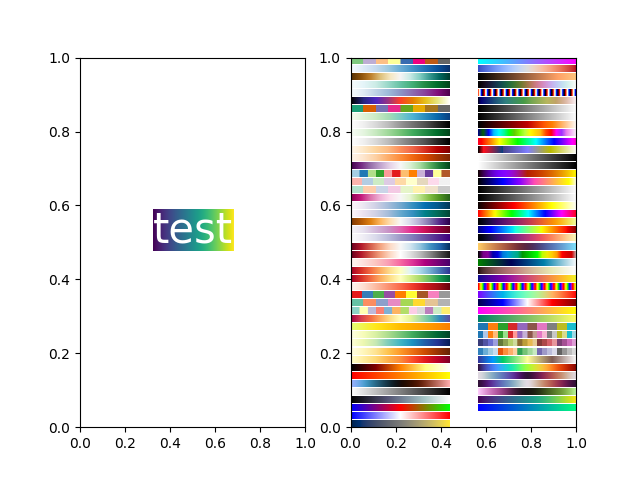
BboxImage 可用于根据边界框定位图像.此演示展示了如何在一个 text.Text 的边界框内显示图像,以及如何手动创建一个图像的边界框.
import matplotlib.pyplot as plt
import numpy as np

from matplotlib.image import BboxImage
from matplotlib.transforms import Bbox, TransformedBbox

fig, (ax1, ax2) = plt.subplots(ncols=2)

# ----------------------------
# Create a BboxImage with Text
# ----------------------------
txt = ax1.text(0.5, 0.5, "test", size=30, ha="center", color="w")
ax1.add_artist(
    BboxImage(txt.get_window_extent, data=np.arange(256).reshape((1, -1))))

# ------------------------------------
# Create a BboxImage for each colormap
# ------------------------------------
# List of all colormaps; skip reversed colormaps.
cmap_names = sorted(m for m in plt.colormaps if not m.endswith("_r"))

ncol = 2
nrow = len(cmap_names) // ncol + 1

xpad_fraction = 0.3
dx = 1 / (ncol + xpad_fraction * (ncol - 1))

ypad_fraction = 0.3
dy = 1 / (nrow + ypad_fraction * (nrow - 1))

for i, cmap_name in enumerate(cmap_names):
    ix, iy = divmod(i, nrow)
    bbox0 = Bbox.from_bounds(ix*dx*(1+xpad_fraction),
                             1 - iy*dy*(1+ypad_fraction) - dy,
                             dx, dy)
    bbox = TransformedBbox(bbox0, ax2.transAxes)
    ax2.add_artist(
        BboxImage(bbox, cmap=cmap_name, data=np.arange(256).reshape((1, -1))))

plt.show()
参考
以下函数,方法,类和模块的用法在本例中显示:
matplotlib.image.BboxImagematplotlib.transforms.Bboxmatplotlib.transforms.TransformedBboxmatplotlib.text.Text