
备注
Go to the end 以下载完整的示例代码.
绘制日期和字符串#
使用 Matplotlib 绘图方法的最基本方法是将坐标作为数值 numpy 数组传递.例如,如果 x 和 y 是浮点数(或整数)的 numpy 数组,则 plot(x, y) 将起作用.如果 numpy.asarray 将 x 和 y 转换为浮点数数组,则绘图方法也将起作用;例如, x 可以是 python 列表.
如果数据类型存在"单位转换器",Matplotlib 也能够转换其他数据类型.Matplotlib 有两个内置转换器,一个用于日期,另一个用于字符串列表.其他下游库有自己的转换器来处理其数据类型.
向 Matplotlib 添加转换器的方法在 matplotlib.units 中进行了描述.这里我们简要概述内置的日期和字符串转换器.
日期转换#
如果 x 和/或 y 是 datetime 的列表或 numpy.datetime64 的数组,则 Matplotlib 具有内置的转换器,该转换器会将 datetime 转换为浮点数,并向轴添加适合日期的刻度定位器和格式化器.见 matplotlib.dates .
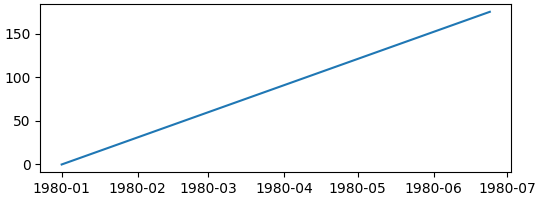
在下面的示例中,x 轴获得了一个转换器,该转换器将 numpy.datetime64 转换为浮点数,一个将刻度放置在月初的定位器,以及一个适当标记刻度的格式化器:
import numpy as np

import matplotlib.dates as mdates
import matplotlib.units as munits

import matplotlib.pyplot as plt

fig, ax = plt.subplots(figsize=(5.4, 2), layout='constrained')
time = np.arange('1980-01-01', '1980-06-25', dtype='datetime64[D]')
x = np.arange(len(time))
ax.plot(time, x)
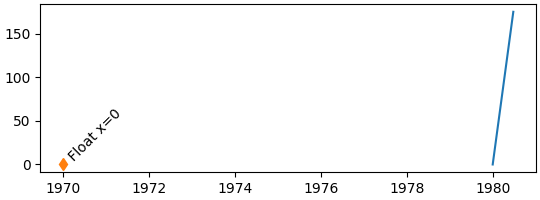
请注意,如果我们尝试在 x 轴上绘制浮点数,它将以自转换器的"epoch"以来的天数为单位绘制,在本例中为 1970-01-01(请参阅 date-format ).因此,当我们绘制值 0 时,刻度从 1970-01-01 开始.(定位器现在还选择每两年一个刻度,而不是每月一个):
fig, ax = plt.subplots(figsize=(5.4, 2), layout='constrained')
time = np.arange('1980-01-01', '1980-06-25', dtype='datetime64[D]')
x = np.arange(len(time))
ax.plot(time, x)
# 0 gets labeled as 1970-01-01
ax.plot(0, 0, 'd')
ax.text(0, 0, ' Float x=0', rotation=45)
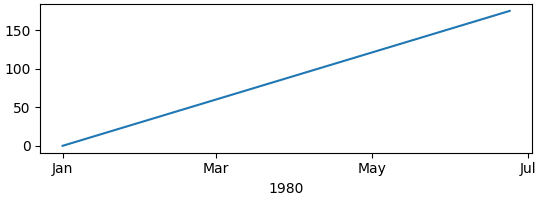
我们可以自定义定位器和格式化器;有关完整列表,请参见 date-locators 和 date-formatters ,有关使用示例,请参见 日期刻度定位器和格式化器 .在这里,我们每隔一个月定位一次,并仅使用月份的 3 个字母名称 "%b" 进行格式化(请参阅 strftime 获取格式代码):
fig, ax = plt.subplots(figsize=(5.4, 2), layout='constrained')
time = np.arange('1980-01-01', '1980-06-25', dtype='datetime64[D]')
x = np.arange(len(time))
ax.plot(time, x)
ax.xaxis.set_major_locator(mdates.MonthLocator(bymonth=np.arange(1, 13, 2)))
ax.xaxis.set_major_formatter(mdates.DateFormatter('%b'))
ax.set_xlabel('1980')
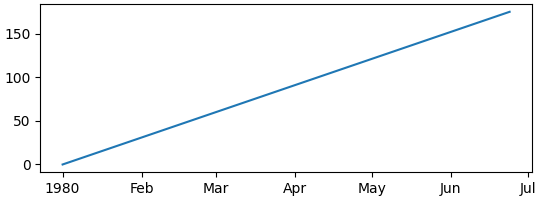
默认的定位器是 AutoDateLocator ,默认的格式化器是 AutoDateFormatter .还有一些 "简洁" 的格式化器和定位器,可以提供更紧凑的标签,并且可以通过 rcParams 设置.请注意,不是在年初使用冗余的 "Jan" 标签,而是使用 "1980".有关更多示例,请参见 使用 ConciseDateFormatter 格式化日期刻度 .
plt.rcParams['date.converter'] = 'concise'

fig, ax = plt.subplots(figsize=(5.4, 2), layout='constrained')
time = np.arange('1980-01-01', '1980-06-25', dtype='datetime64[D]')
x = np.arange(len(time))
ax.plot(time, x)
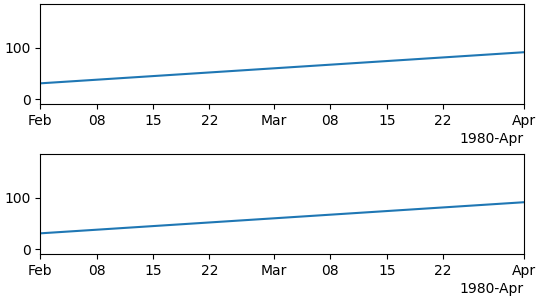
我们可以通过传递适当的日期作为限制,或者通过传递自 epoch 以来以天为单位的浮点值来设置轴的限制. 如果需要,我们可以从 date2num 获取此值.
fig, axs = plt.subplots(2, 1, figsize=(5.4, 3), layout='constrained')
for ax in axs.flat:
    time = np.arange('1980-01-01', '1980-06-25', dtype='datetime64[D]')
    x = np.arange(len(time))
    ax.plot(time, x)

# set xlim using datetime64:
axs[0].set_xlim(np.datetime64('1980-02-01'), np.datetime64('1980-04-01'))

# set xlim using floats:
# Note can get from mdates.date2num(np.datetime64('1980-02-01'))
axs[1].set_xlim(3683, 3683+60)
字符串转换:分类绘图#
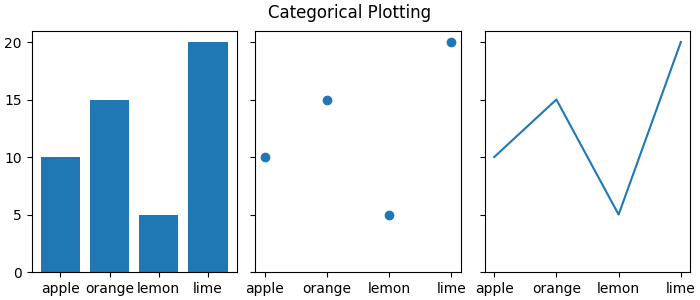
有时我们希望在轴上标记类别而不是数字. Matplotlib 允许使用"分类"转换器(请参阅 category ).
data = {'apple': 10, 'orange': 15, 'lemon': 5, 'lime': 20}
names = list(data.keys())
values = list(data.values())

fig, axs = plt.subplots(1, 3, figsize=(7, 3), sharey=True, layout='constrained')
axs[0].bar(names, values)
axs[1].scatter(names, values)
axs[2].plot(names, values)
fig.suptitle('Categorical Plotting')
请注意,"类别"按照它们首次指定的顺序绘制,并且以不同顺序进行的后续绘图不会影响原始顺序. 此外,新的添加将添加到末尾(请参见下面的"pear"):
fig, ax = plt.subplots(figsize=(5, 3), layout='constrained')
ax.bar(names, values)

# plot in a different order:
ax.scatter(['lemon', 'apple'], [7, 12])

# add a new category, "pear", and put the other categories in a different order:
ax.plot(['pear', 'orange', 'apple', 'lemon'], [13, 10, 7, 12], color='C1')
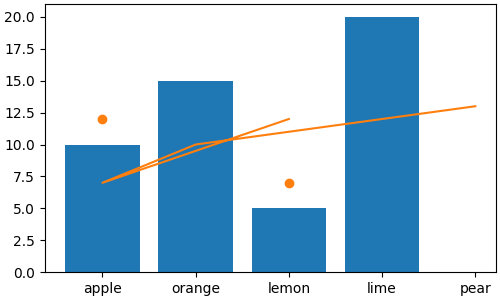
请注意,当像上面一样使用 plot 时,绘图的顺序会映射到数据的原始顺序,因此新线按指定的顺序排列.
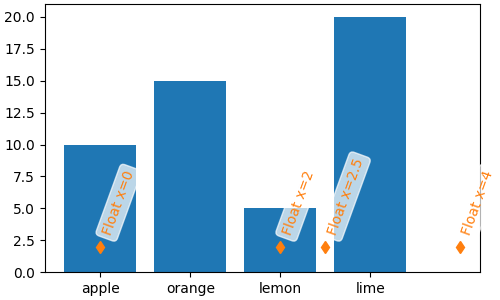
类别转换器将类别映射为整数,从零开始. 因此,也可以使用浮点数手动将数据添加到轴. 请注意,如果传入的浮点数没有与之关联的"类别",则仍可以绘制数据点,但不会创建刻度. 在下面的示例中,我们在 4.0 和 2.5 处绘制数据,但此处未添加刻度,因为它们不是类别.
fig, ax = plt.subplots(figsize=(5, 3), layout='constrained')
ax.bar(names, values)
# arguments for styling the labels below:
args = {'rotation': 70, 'color': 'C1',
        'bbox': {'color': 'white', 'alpha': .7, 'boxstyle': 'round'}}


# 0 gets labeled as "apple"
ax.plot(0, 2, 'd', color='C1')
ax.text(0, 3, 'Float x=0', **args)

# 2 gets labeled as "lemon"
ax.plot(2, 2, 'd', color='C1')
ax.text(2, 3, 'Float x=2', **args)

# 4 doesn't get a label
ax.plot(4, 2, 'd', color='C1')
ax.text(4, 3, 'Float x=4', **args)

# 2.5 doesn't get a label
ax.plot(2.5, 2, 'd', color='C1')
ax.text(2.5, 3, 'Float x=2.5', **args)
可以通过指定类别或指定浮点数来设置类别轴的限制:
fig, axs = plt.subplots(2, 1, figsize=(5, 5), layout='constrained')
ax = axs[0]
ax.bar(names, values)
ax.set_xlim('orange', 'lemon')
ax.set_xlabel('limits set with categories')
ax = axs[1]
ax.bar(names, values)
ax.set_xlim(0.5, 2.5)
ax.set_xlabel('limits set with floats')
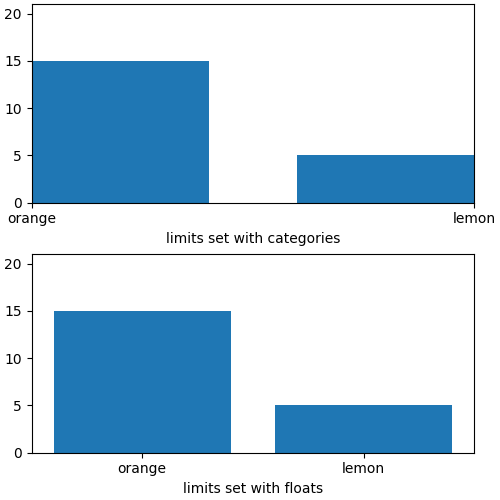
类别轴对于某些绘图类型很有用,但如果数据以字符串列表的形式读取,即使它应为浮点数或日期列表,也可能会导致混淆. 读取逗号分隔值 (CSV) 文件时有时会发生这种情况. 分类定位器和格式化器将在每个字符串值处放置一个刻度,并标记每个字符串值:
fig, ax = plt.subplots(figsize=(5.4, 2.5), layout='constrained')
x = [str(xx) for xx in np.arange(100)]  # list of strings
ax.plot(x, np.arange(100))
ax.set_xlabel('x is list of strings')
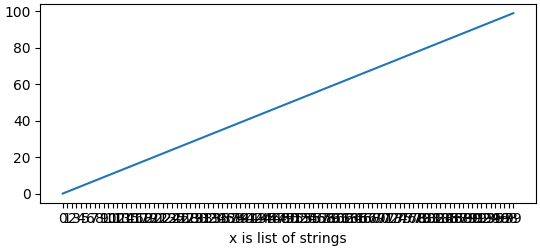
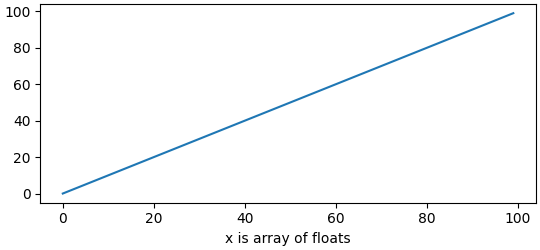
如果不需要这样做,只需在绘图之前将数据转换为浮点数:
fig, ax = plt.subplots(figsize=(5.4, 2.5), layout='constrained')
x = np.asarray(x, dtype='float')  # array of float.
ax.plot(x, np.arange(100))
ax.set_xlabel('x is array of floats')
确定轴上的转换器,格式化器和定位器#
有时能够调试 Matplotlib 用于转换传入数据的内容会很有帮助. 我们可以通过查询轴上的 converter 属性来实现. 我们还可以使用 get_major_locator 和 get_major_formatter 查询格式化器和定位器.
请注意,默认情况下,转换器为 None.
fig, axs = plt.subplots(3, 1, figsize=(6.4, 7), layout='constrained')
x = np.arange(100)
ax = axs[0]
ax.plot(x, x)
label = f'Converter: {ax.xaxis.get_converter()}\n '
label += f'Locator: {ax.xaxis.get_major_locator()}\n'
label += f'Formatter: {ax.xaxis.get_major_formatter()}\n'
ax.set_xlabel(label)

ax = axs[1]
time = np.arange('1980-01-01', '1980-06-25', dtype='datetime64[D]')
x = np.arange(len(time))
ax.plot(time, x)
label = f'Converter: {ax.xaxis.get_converter()}\n '
label += f'Locator: {ax.xaxis.get_major_locator()}\n'
label += f'Formatter: {ax.xaxis.get_major_formatter()}\n'
ax.set_xlabel(label)

ax = axs[2]
data = {'apple': 10, 'orange': 15, 'lemon': 5, 'lime': 20}
names = list(data.keys())
values = list(data.values())
ax.plot(names, values)
label = f'Converter: {ax.xaxis.get_converter()}\n '
label += f'Locator: {ax.xaxis.get_major_locator()}\n'
label += f'Formatter: {ax.xaxis.get_major_formatter()}\n'
ax.set_xlabel(label)
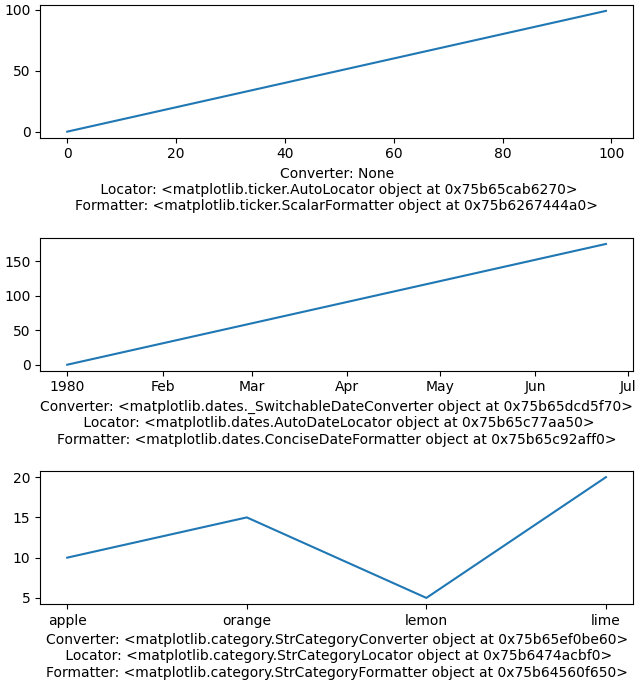
更多关于"单位"支持#
对日期和类别的支持是 Matplotlib 内置的"单位"支持的一部分. 这在 matplotlib.units 和 基本单位 示例中进行了描述.
单位支持的工作原理是查询传递给绘图函数的数据类型,并分派给列表中第一个接受该数据类型的转换器. 因此,在下面,如果 x 中包含 datetime 对象,则转换器将为 _SwitchableDateConverter ;如果它包含字符串,则它将被发送到 StrCategoryConverter .
for k, v in munits.registry.items():
    print(f"type: {k};\n    converter: {type(v)}")
type: <class 'decimal.Decimal'>;
    converter: <class 'matplotlib.units.DecimalConverter'>
type: <class 'numpy.datetime64'>;
    converter: <class 'matplotlib.dates._SwitchableDateConverter'>
type: <class 'datetime.date'>;
    converter: <class 'matplotlib.dates._SwitchableDateConverter'>
type: <class 'datetime.datetime'>;
    converter: <class 'matplotlib.dates._SwitchableDateConverter'>
type: <class 'str'>;
    converter: <class 'matplotlib.category.StrCategoryConverter'>
type: <class 'numpy.str_'>;
    converter: <class 'matplotlib.category.StrCategoryConverter'>
type: <class 'bytes'>;
    converter: <class 'matplotlib.category.StrCategoryConverter'>
type: <class 'numpy.bytes_'>;
    converter: <class 'matplotlib.category.StrCategoryConverter'>
有许多下游库提供了它们自己的带有定位器和格式化器的转换器.物理单位支持由 astropy , pint 和 unyt 等提供.
像 pandas 和 nc-time-axis (以及 xarray ) 这样的高级库提供了它们自己的日期时间支持.这种支持有时可能与 Matplotlib 原生的日期时间支持不兼容,因此如果正在使用这些库,则在使用 Matplotlib 定位器和格式化器时应谨慎.
脚本的总运行时间:(0 分钟 4.476 秒)