
备注
Go to the end 下载完整的示例代码.
imshow 中的 origin 和 extent#
imshow() 允许您将图像(可以是将被颜色映射的 2D 数组(基于 norm 和 cmap),也可以是将被直接使用的 3D RGB(A) 数组)渲染到数据空间中的矩形区域.最终渲染中图像的方向由 origin 和 extent 关键字参数(以及生成的 AxesImage 实例上的属性)和 Axes 的数据限制控制.
extent 关键字参数控制图像将填充的数据坐标中的边界框,指定为数据坐标中的 (left, right, bottom, top) ,origin 关键字参数控制图像如何填充该边界框,并且最终渲染图像中的方向也受坐标轴限制的影响.
提示
下面的大部分代码用于向绘图添加标签和信息性文本.origin 和 extent 的描述效果可以在绘图中看到,而无需遵循所有代码细节.
为了快速理解,您可能希望跳过下面的代码细节,直接继续讨论结果.
import matplotlib.pyplot as plt
import numpy as np

from matplotlib.gridspec import GridSpec


def index_to_coordinate(index, extent, origin):
    """Return the pixel center of an index."""
    left, right, bottom, top = extent

    hshift = 0.5 * np.sign(right - left)
    left, right = left + hshift, right - hshift
    vshift = 0.5 * np.sign(top - bottom)
    bottom, top = bottom + vshift, top - vshift

    if origin == 'upper':
        bottom, top = top, bottom

    return {
        "[0, 0]": (left, bottom),
        "[M', 0]": (left, top),
        "[0, N']": (right, bottom),
        "[M', N']": (right, top),
    }[index]


def get_index_label_pos(index, extent, origin, inverted_xindex):
    """
    Return the desired position and horizontal alignment of an index label.
    """
    if extent is None:
        extent = lookup_extent(origin)
    left, right, bottom, top = extent
    x, y = index_to_coordinate(index, extent, origin)

    is_x0 = index[-2:] == "0]"
    halign = 'left' if is_x0 ^ inverted_xindex else 'right'
    hshift = 0.5 * np.sign(left - right)
    x += hshift * (1 if is_x0 else -1)
    return x, y, halign


def get_color(index, data, cmap):
    """Return the data color of an index."""
    val = {
        "[0, 0]": data[0, 0],
        "[0, N']": data[0, -1],
        "[M', 0]": data[-1, 0],
        "[M', N']": data[-1, -1],
    }[index]
    return cmap(val / data.max())


def lookup_extent(origin):
    """Return extent for label positioning when not given explicitly."""
    if origin == 'lower':
        return (-0.5, 6.5, -0.5, 5.5)
    else:
        return (-0.5, 6.5, 5.5, -0.5)


def set_extent_None_text(ax):
    ax.text(3, 2.5, 'equals\nextent=None', size='large',
            ha='center', va='center', color='w')


def plot_imshow_with_labels(ax, data, extent, origin, xlim, ylim):
    """Actually run ``imshow()`` and add extent and index labels."""
    im = ax.imshow(data, origin=origin, extent=extent)

    # extent labels (left, right, bottom, top)
    left, right, bottom, top = im.get_extent()
    if xlim is None or top > bottom:
        upper_string, lower_string = 'top', 'bottom'
    else:
        upper_string, lower_string = 'bottom', 'top'
    if ylim is None or left < right:
        port_string, starboard_string = 'left', 'right'
        inverted_xindex = False
    else:
        port_string, starboard_string = 'right', 'left'
        inverted_xindex = True
    bbox_kwargs = {'fc': 'w', 'alpha': .75, 'boxstyle': "round4"}
    ann_kwargs = {'xycoords': 'axes fraction',
                  'textcoords': 'offset points',
                  'bbox': bbox_kwargs}
    ax.annotate(upper_string, xy=(.5, 1), xytext=(0, -1),
                ha='center', va='top', **ann_kwargs)
    ax.annotate(lower_string, xy=(.5, 0), xytext=(0, 1),
                ha='center', va='bottom', **ann_kwargs)
    ax.annotate(port_string, xy=(0, .5), xytext=(1, 0),
                ha='left', va='center', rotation=90,
                **ann_kwargs)
    ax.annotate(starboard_string, xy=(1, .5), xytext=(-1, 0),
                ha='right', va='center', rotation=-90,
                **ann_kwargs)
    ax.set_title(f'origin: {origin}')

    # index labels
    for index in ["[0, 0]", "[0, N']", "[M', 0]", "[M', N']"]:
        tx, ty, halign = get_index_label_pos(index, extent, origin,
                                             inverted_xindex)
        facecolor = get_color(index, data, im.get_cmap())
        ax.text(tx, ty, index, color='white', ha=halign, va='center',
                bbox={'boxstyle': 'square', 'facecolor': facecolor})
    if xlim:
        ax.set_xlim(*xlim)
    if ylim:
        ax.set_ylim(*ylim)


def generate_imshow_demo_grid(extents, xlim=None, ylim=None):
    N = len(extents)
    fig = plt.figure(tight_layout=True)
    fig.set_size_inches(6, N * (11.25) / 5)
    gs = GridSpec(N, 5, figure=fig)

    columns = {'label': [fig.add_subplot(gs[j, 0]) for j in range(N)],
               'upper': [fig.add_subplot(gs[j, 1:3]) for j in range(N)],
               'lower': [fig.add_subplot(gs[j, 3:5]) for j in range(N)]}
    x, y = np.ogrid[0:6, 0:7]
    data = x + y

    for origin in ['upper', 'lower']:
        for ax, extent in zip(columns[origin], extents):
            plot_imshow_with_labels(ax, data, extent, origin, xlim, ylim)

    columns['label'][0].set_title('extent=')
    for ax, extent in zip(columns['label'], extents):
        if extent is None:
            text = 'None'
        else:
            left, right, bottom, top = extent
            text = (f'left: {left:0.1f}\nright: {right:0.1f}\n'
                    f'bottom: {bottom:0.1f}\ntop: {top:0.1f}\n')
        ax.text(1., .5, text, transform=ax.transAxes, ha='right', va='center')
        ax.axis('off')
    return columns
默认 extent#
首先,让我们看一下默认的 extent=None
generate_imshow_demo_grid(extents=[None])
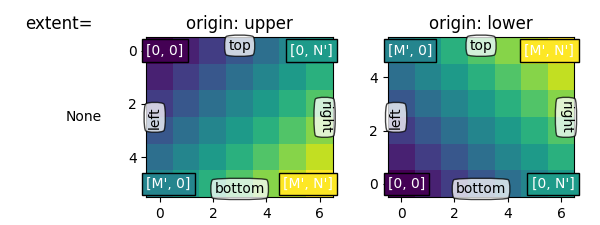
通常,对于形状为 (M, N) 的数组,第一个索引沿垂直方向运行,第二个索引沿水平方向运行.像素中心位于水平方向上从 0 到 N' = N - 1 ,垂直方向上从 0 到 M' = M - 1 的整数位置.origin 确定如何在边界框中填充数据.
对于 origin='lower' :
[0, 0] 位于 (left, bottom)
[M', 0] 位于 (left, top)
[0, N'] 位于 (right, bottom)
[M', N'] 位于 (right, top)
origin='upper' 反转垂直轴方向和填充:
[0, 0] 位于 (left, top)
[M', 0] 位于 (left, bottom)
[0, N'] 位于 (right, top)
[M', N'] 位于 (right, bottom)
总之,[0, 0] 索引的位置以及 extent 受 origin 影响:
origin |
[0, 0] 位置 |
extent |
|---|---|---|
upper |
左上角 |
|
lower |
左下角 |
|
origin 的默认值由 rcParams["image.origin"] (default: 'upper') 设置,后者默认为 'upper' ,以匹配数学和计算机图形图像索引约定中的矩阵索引约定.
显式 extent#
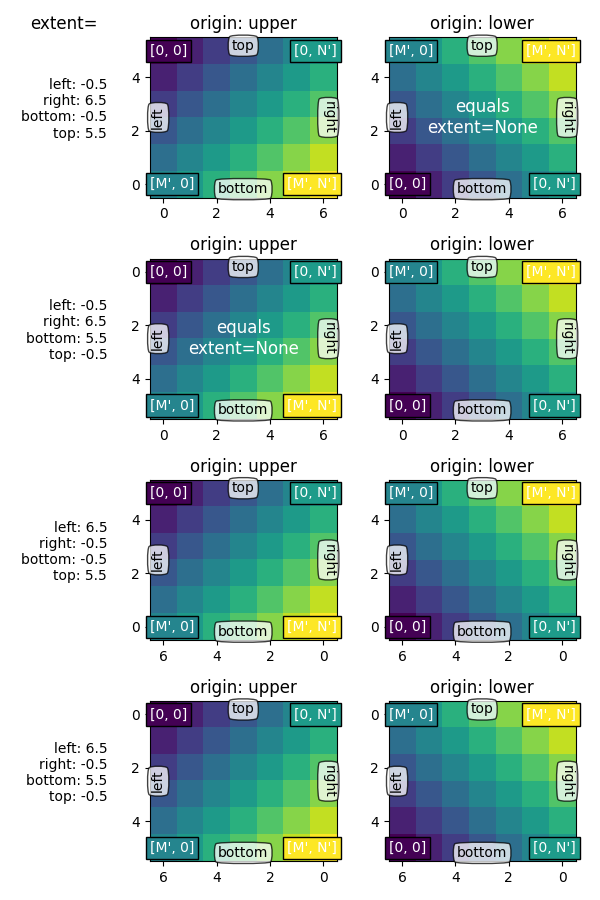
通过设置 extent,我们定义了图像区域的坐标.底层图像数据被插值/重采样以填充该区域.
如果 Axes 设置为自动缩放,则 Axes 的视图限制将设置为匹配 extent,这确保了 (left, bottom) 设置的坐标位于 Axes 的左下角! 但是,这可能会反转轴,因此它们不会以"自然"方向增加.
extents = [(-0.5, 6.5, -0.5, 5.5),
           (-0.5, 6.5, 5.5, -0.5),
           (6.5, -0.5, -0.5, 5.5),
           (6.5, -0.5, 5.5, -0.5)]

columns = generate_imshow_demo_grid(extents)
set_extent_None_text(columns['upper'][1])
set_extent_None_text(columns['lower'][0])
显式 extent 和坐标轴限制#
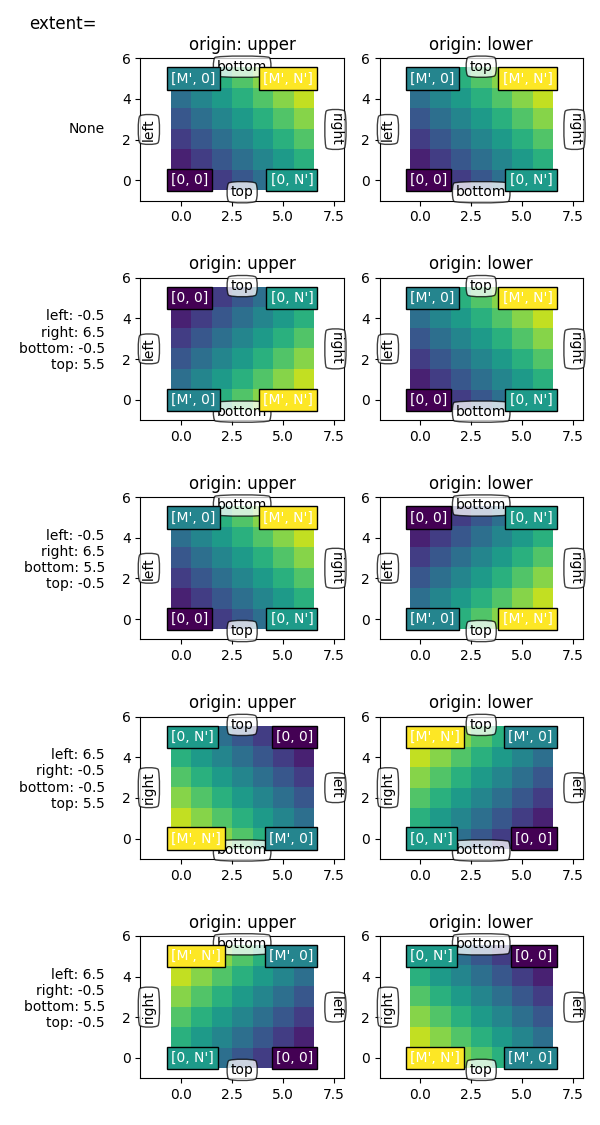
如果我们通过显式设置 set_xlim / set_ylim 来固定坐标轴限制,我们将强制坐标轴具有特定的大小和方向.这可以将图像的"左右"和"上下"方向与屏幕上的方向分离.
在下面的示例中,我们选择的限制略大于 extent(注意 Axes 中的白色区域).
虽然我们保持 extent 与之前的示例相同,但坐标 (0, 0) 现在被明确地放在左下角,并且值从观看者的角度来看会向上和向右增加.我们可以看到:
坐标
(left, bottom)锚定图像,然后填充朝向数据空间中的(right, top)点的框.第一列始终最靠近"左侧".
origin 控制第一行是否最靠近"顶部"或"底部".
图像可以沿任一方向反转.
图像的"左右"和"上下"方向可以与屏幕上的方向分离.
generate_imshow_demo_grid(extents=[None] + extents,
                          xlim=(-2, 8), ylim=(-1, 6))

plt.show()
脚本的总运行时间:(0 分钟 4.816 秒)