
备注
Go to the end 下载完整的示例代码.
文本属性和布局#
使用 Matplotlib 控制文本及其布局的属性.
matplotlib.text.Text 实例有多种属性,可以通过关键字参数配置,例如 set_title , set_xlabel , text 等.
属性 |
值类型 |
|---|---|
alpha |
|
backgroundcolor |
任何 matplotlib color |
bbox |
|
clip_box |
一个 matplotlib.transform.Bbox 实例 |
clip_on |
bool |
clip_path |
一个 |
color |
任何 matplotlib color |
family |
[ |
fontproperties |
|
horizontalalignment 或 ha |
[ |
label |
任何字符串 |
linespacing |
|
multialignment |
[ |
name 或 fontname |
字符串,例如 [ |
picker |
[None|float|bool|callable] |
position |
(x, y) |
rotation |
[ 角度,以度为单位 | |
size 或 fontsize |
[ 以磅为单位的大小 | 相对大小,例如, |
style 或 fontstyle |
[ |
text |
字符串或任何可以用 '%s' 转换打印的东西 |
transform |
|
variant |
[ |
verticalalignment 或 va |
[ |
visible |
bool |
weight 或 fontweight |
[ |
x |
|
y |
|
zorder |
任何数字 |
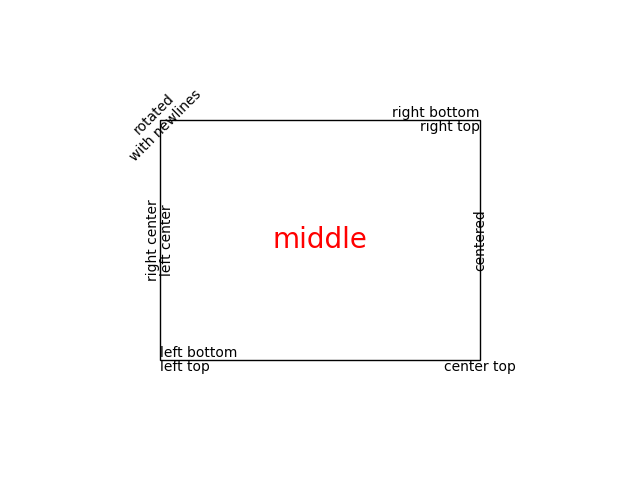
您可以使用对齐参数 horizontalalignment , verticalalignment 和 multialignment 来布置文本. horizontalalignment 控制文本的 x 位置参数是指示文本边界框的左侧,中心还是右侧. verticalalignment 控制文本的 y 位置参数是指示文本边界框的底部,中心还是顶部. multialignment 仅适用于换行符分隔的字符串,控制不同的行是左对齐,居中对齐还是右对齐.这是一个使用 text() 命令显示各种对齐可能性的示例.整个代码中使用 transform=ax.transAxes 表示坐标是相对于 Axes 边界框给出的,其中 (0, 0) 是 Axes 的左下角,(1, 1) 是右上角.
import matplotlib.pyplot as plt

import matplotlib.patches as patches

# build a rectangle in axes coords
left, width = .25, .5
bottom, height = .25, .5
right = left + width
top = bottom + height

fig = plt.figure()
ax = fig.add_axes([0, 0, 1, 1])

# axes coordinates: (0, 0) is bottom left and (1, 1) is upper right
p = patches.Rectangle(
    (left, bottom), width, height,
    fill=False, transform=ax.transAxes, clip_on=False
    )

ax.add_patch(p)

ax.text(left, bottom, 'left top',
        horizontalalignment='left',
        verticalalignment='top',
        transform=ax.transAxes)

ax.text(left, bottom, 'left bottom',
        horizontalalignment='left',
        verticalalignment='bottom',
        transform=ax.transAxes)

ax.text(right, top, 'right bottom',
        horizontalalignment='right',
        verticalalignment='bottom',
        transform=ax.transAxes)

ax.text(right, top, 'right top',
        horizontalalignment='right',
        verticalalignment='top',
        transform=ax.transAxes)

ax.text(right, bottom, 'center top',
        horizontalalignment='center',
        verticalalignment='top',
        transform=ax.transAxes)

ax.text(left, 0.5*(bottom+top), 'right center',
        horizontalalignment='right',
        verticalalignment='center',
        rotation='vertical',
        transform=ax.transAxes)

ax.text(left, 0.5*(bottom+top), 'left center',
        horizontalalignment='left',
        verticalalignment='center',
        rotation='vertical',
        transform=ax.transAxes)

ax.text(0.5*(left+right), 0.5*(bottom+top), 'middle',
        horizontalalignment='center',
        verticalalignment='center',
        fontsize=20, color='red',
        transform=ax.transAxes)

ax.text(right, 0.5*(bottom+top), 'centered',
        horizontalalignment='center',
        verticalalignment='center',
        rotation='vertical',
        transform=ax.transAxes)

ax.text(left, top, 'rotated\nwith newlines',
        horizontalalignment='center',
        verticalalignment='center',
        rotation=45,
        transform=ax.transAxes)

ax.set_axis_off()
plt.show()
默认字体#
基本默认字体由一组 rcParams 控制.要设置数学表达式的字体,请使用以 mathtext 开头的 rcParams(请参阅 mathtext ).
rcParam |
用法 |
|---|---|
|
字体族列表(安装在用户机器上)和/或 |
|
默认样式,例如 |
|
默认变体,例如 |
|
默认拉伸,例如 |
|
默认粗细.字符串或整数 |
|
默认字体大小,以磅为单位.相对字体大小( |
Matplotlib 可以使用安装在用户计算机上的字体族,例如 Helvetica,Times 等.字体族也可以使用通用字体族别名指定,例如 ( {'cursive', 'fantasy', 'monospace', 'sans', 'sans serif', 'sans-serif', 'serif'} ).
备注
要访问可用字体的完整列表:
matplotlib.font_manager.get_font_names()
通用字体族别名和实际字体族之间的映射(在 default rcParams 中提到)由以下 rcParams 控制:
基于 CSS 的通用字体族别名 |
带有映射的 rcParam |
|---|---|
|
|
|
|
|
|
|
|
|
|
如果任何通用字体族名称出现在 'font.family' 中,我们将该条目替换为相应 rcParam 映射中的所有条目.例如:
matplotlib.rcParams['font.family'] = ['Family1', 'serif', 'Family2']
matplotlib.rcParams['font.serif'] = ['SerifFamily1', 'SerifFamily2']

# This is effectively translated to:
matplotlib.rcParams['font.family'] = ['Family1', 'SerifFamily1', 'SerifFamily2', 'Family2']
包含非拉丁字符的文本#
从 v2.0 版本开始, default font ,即 DejaVu,包含多种西方字母的字形,但不包含其他文字,例如中文,韩文或日文.
要将默认字体设置为支持您需要的代码点的字体,请将字体名称添加到 'font.family' (推荐),或者添加到所需的别名列表.
# first method
matplotlib.rcParams['font.family'] = ['Source Han Sans TW', 'sans-serif']

# second method
matplotlib.rcParams['font.family'] = ['sans-serif']
matplotlib.rcParams['sans-serif'] = ['Source Han Sans TW', ...]
通用族别名列表包含与 Matplotlib 一起提供的字体(因此它们有 100% 的机会被找到),或者在大多数系统中很有可能存在的字体.
设置自定义字体系列时,一个好的做法是将通用族别添加到字体系列列表作为最后的手段.
您也可以在 .matplotlibrc 文件中设置它:
font.family: Source Han Sans TW, Arial, sans-serif
要控制每个艺术家使用的字体,请使用 文本属性和布局 中记录的 name,fontname 或 fontproperties 关键字参数.
在 Linux 上, fc-list 可以是一个有用的工具来发现字体名称;例如
$ fc-list :lang=zh family
Noto to Sans Mono CJK TC,Noto Sans Mono CJK TC Bold
Noto Sans CJK TC,Noto Sans CJK TC Medium
Noto Sans CJK TC,Noto Sans CJK TC DemiLight
Noto Sans CJK KR,Noto Sans CJK KR Black
Noto Sans CJK TC,Noto Sans CJK TC Black
Noto Sans Mono CJK TC,Noto Sans Mono CJK TC Regular
Noto Sans CJK SC,Noto Sans CJK SC Light
列出所有支持中文的字体.