
备注
Go to the end 下载完整的示例代码..
通过使用 blitting 加快渲染速度#
Blitting 是一种 standard technique ,在 Matplotlib 的上下文中,可用于(显著)提高交互式图形的性能.例如, animation 和 widgets 模块在内部使用 blitting.在这里,我们将演示如何在这些类之外实现您自己的 blitting.
Blitting 通过将所有非更改的图形元素一次性渲染到背景图像中来加速重复绘图.然后,对于每次绘图,只需要将更改的元素绘制到此背景上.例如,如果 Axes 的限制没有更改,我们可以渲染空 Axes,包括所有刻度和标签一次,然后仅绘制更改的数据.
该策略是
准备常量背景:
绘制图形,但排除所有要通过将它们标记为 animated 来制作动画的 artist(参见
Artist.set_animated).保存 RBGA 缓冲区的副本.
渲染单个图像:
恢复 RGBA 缓冲区的副本.
使用
Axes.draw_artist/Figure.draw_artist重新绘制 animated artists.在屏幕上显示生成的图像.
此过程的一个结果是,您的 animated artists 始终绘制在静态 artists 的顶部.
并非所有后端都支持位图传递.您可以通过 .FigureCanvasBase.supports_blit 属性来检查给定的画布是否支持.
警告
这段代码不适用于 macosx 后端(但适用于 Mac 上的其他 GUI 后端).
最小示例#
我们可以使用 .FigureCanvasAgg 方法 copy_from_bbox 和 restore_region ,并结合在我们的艺术家上设置 animated=True 来实现一个使用位图传递来加速渲染的最小示例.
import matplotlib.pyplot as plt
import numpy as np

x = np.linspace(0, 2 * np.pi, 100)

fig, ax = plt.subplots()

# animated=True tells matplotlib to only draw the artist when we
# explicitly request it
(ln,) = ax.plot(x, np.sin(x), animated=True)

# make sure the window is raised, but the script keeps going
plt.show(block=False)

# stop to admire our empty window axes and ensure it is rendered at
# least once.
#
# We need to fully draw the figure at its final size on the screen
# before we continue on so that :
#  a) we have the correctly sized and drawn background to grab
#  b) we have a cached renderer so that ``ax.draw_artist`` works
# so we spin the event loop to let the backend process any pending operations
plt.pause(0.1)

# get copy of entire figure (everything inside fig.bbox) sans animated artist
bg = fig.canvas.copy_from_bbox(fig.bbox)
# draw the animated artist, this uses a cached renderer
ax.draw_artist(ln)
# show the result to the screen, this pushes the updated RGBA buffer from the
# renderer to the GUI framework so you can see it
fig.canvas.blit(fig.bbox)

for j in range(100):
    # reset the background back in the canvas state, screen unchanged
    fig.canvas.restore_region(bg)
    # update the artist, neither the canvas state nor the screen have changed
    ln.set_ydata(np.sin(x + (j / 100) * np.pi))
    # re-render the artist, updating the canvas state, but not the screen
    ax.draw_artist(ln)
    # copy the image to the GUI state, but screen might not be changed yet
    fig.canvas.blit(fig.bbox)
    # flush any pending GUI events, re-painting the screen if needed
    fig.canvas.flush_events()
    # you can put a pause in if you want to slow things down
    # plt.pause(.1)
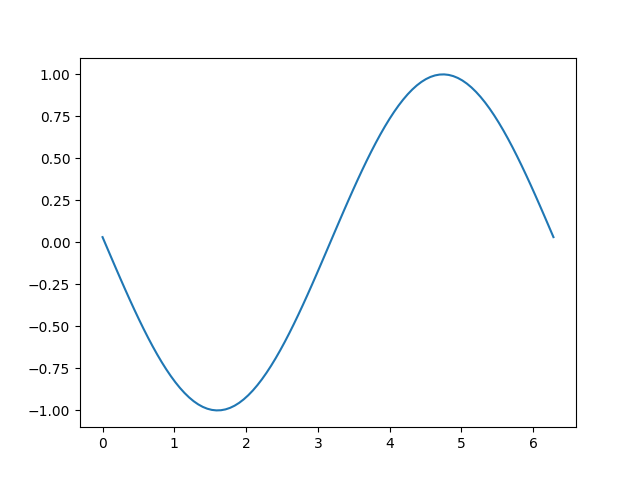
这个例子可以工作,并显示了一个简单的动画,但是因为我们只抓取一次背景,如果图中像素的大小发生了变化(由于图形的大小或 dpi 发生了变化),背景将失效,导致不正确的(但有时看起来很酷!)图像.还有一个全局变量和相当多的样板代码,这表明我们应该将其封装在一个类中.
基于类的示例#
我们可以使用一个类来封装样板逻辑和状态,包括恢复背景,绘制艺术家,然后将结果位图传递到屏幕上.此外,我们可以使用 'draw_event' 回调来捕获一个新的背景,只要发生完整的重绘,就可以正确处理大小调整.
class BlitManager:
    def __init__(self, canvas, animated_artists=()):
        """
        Parameters
        ----------
        canvas : FigureCanvasAgg
            The canvas to work with, this only works for subclasses of the Agg
            canvas which have the `~FigureCanvasAgg.copy_from_bbox` and
            `~FigureCanvasAgg.restore_region` methods.

        animated_artists : Iterable[Artist]
            List of the artists to manage
        """
        self.canvas = canvas
        self._bg = None
        self._artists = []

        for a in animated_artists:
            self.add_artist(a)
        # grab the background on every draw
        self.cid = canvas.mpl_connect("draw_event", self.on_draw)

    def on_draw(self, event):
        """Callback to register with 'draw_event'."""
        cv = self.canvas
        if event is not None:
            if event.canvas != cv:
                raise RuntimeError
        self._bg = cv.copy_from_bbox(cv.figure.bbox)
        self._draw_animated()

    def add_artist(self, art):
        """
        Add an artist to be managed.

        Parameters
        ----------
        art : Artist

            The artist to be added.  Will be set to 'animated' (just
            to be safe).  *art* must be in the figure associated with
            the canvas this class is managing.

        """
        if art.figure != self.canvas.figure:
            raise RuntimeError
        art.set_animated(True)
        self._artists.append(art)

    def _draw_animated(self):
        """Draw all of the animated artists."""
        fig = self.canvas.figure
        for a in self._artists:
            fig.draw_artist(a)

    def update(self):
        """Update the screen with animated artists."""
        cv = self.canvas
        fig = cv.figure
        # paranoia in case we missed the draw event,
        if self._bg is None:
            self.on_draw(None)
        else:
            # restore the background
            cv.restore_region(self._bg)
            # draw all of the animated artists
            self._draw_animated()
            # update the GUI state
            cv.blit(fig.bbox)
        # let the GUI event loop process anything it has to do
        cv.flush_events()
这是我们将如何使用我们的类.这是一个比第一个例子稍微复杂的例子,因为我们还添加了一个文本帧计数器.
# make a new figure
fig, ax = plt.subplots()
# add a line
(ln,) = ax.plot(x, np.sin(x), animated=True)
# add a frame number
fr_number = ax.annotate(
    "0",
    (0, 1),
    xycoords="axes fraction",
    xytext=(10, -10),
    textcoords="offset points",
    ha="left",
    va="top",
    animated=True,
)
bm = BlitManager(fig.canvas, [ln, fr_number])
# make sure our window is on the screen and drawn
plt.show(block=False)
plt.pause(.1)

for j in range(100):
    # update the artists
    ln.set_ydata(np.sin(x + (j / 100) * np.pi))
    fr_number.set_text(f"frame: {j}")
    # tell the blitting manager to do its thing
    bm.update()
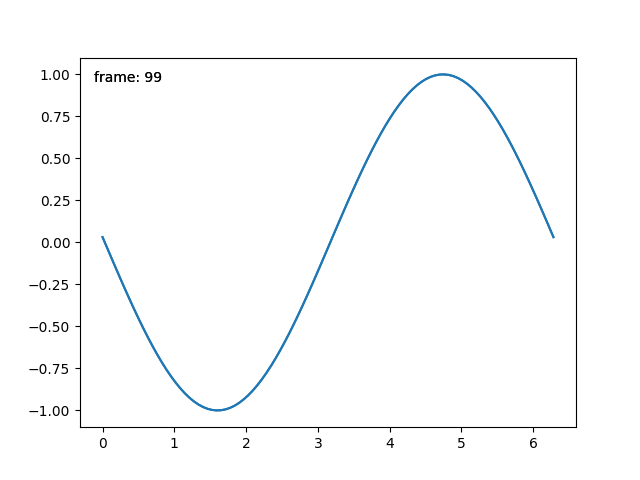
这个类不依赖于 pyplot ,适合嵌入到更大的 GUI 应用程序中.