
备注
Go to the end 下载完整的示例代码.
Axis 比例#
默认情况下,Matplotlib 使用线性比例在轴上显示数据. Matplotlib 还支持 logarithmic scales 以及其他不太常见的比例.通常,这可以通过使用 set_xscale 或 set_yscale 方法直接完成.
import matplotlib.pyplot as plt
import numpy as np

import matplotlib.scale as mscale
from matplotlib.ticker import FixedLocator, NullFormatter

fig, axs = plt.subplot_mosaic([['linear', 'linear-log'],
                               ['log-linear', 'log-log']], layout='constrained')

x = np.arange(0, 3*np.pi, 0.1)
y = 2 * np.sin(x) + 3

ax = axs['linear']
ax.plot(x, y)
ax.set_xlabel('linear')
ax.set_ylabel('linear')

ax = axs['linear-log']
ax.plot(x, y)
ax.set_yscale('log')
ax.set_xlabel('linear')
ax.set_ylabel('log')

ax = axs['log-linear']
ax.plot(x, y)
ax.set_xscale('log')
ax.set_xlabel('log')
ax.set_ylabel('linear')

ax = axs['log-log']
ax.plot(x, y)
ax.set_xscale('log')
ax.set_yscale('log')
ax.set_xlabel('log')
ax.set_ylabel('log')

loglog 和 semilogx/y#
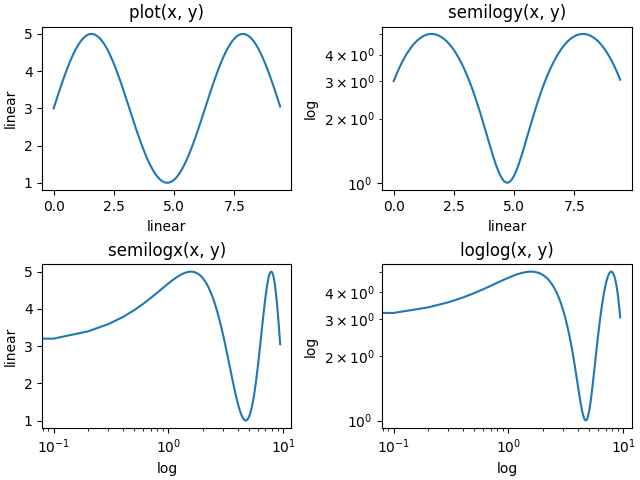
对数轴的使用非常频繁,因此有一组助手函数可以执行相同的操作:semilogy , semilogx 和 loglog .
fig, axs = plt.subplot_mosaic([['linear', 'linear-log'],
                               ['log-linear', 'log-log']], layout='constrained')

x = np.arange(0, 3*np.pi, 0.1)
y = 2 * np.sin(x) + 3

ax = axs['linear']
ax.plot(x, y)
ax.set_xlabel('linear')
ax.set_ylabel('linear')
ax.set_title('plot(x, y)')

ax = axs['linear-log']
ax.semilogy(x, y)
ax.set_xlabel('linear')
ax.set_ylabel('log')
ax.set_title('semilogy(x, y)')

ax = axs['log-linear']
ax.semilogx(x, y)
ax.set_xlabel('log')
ax.set_ylabel('linear')
ax.set_title('semilogx(x, y)')

ax = axs['log-log']
ax.loglog(x, y)
ax.set_xlabel('log')
ax.set_ylabel('log')
ax.set_title('loglog(x, y)')
其他内置比例#
还有其他比例可以使用.已注册比例的列表可以从 scale.get_scale_names 返回:
print(mscale.get_scale_names())
['asinh', 'function', 'functionlog', 'linear', 'log', 'logit', 'mercator', 'symlog']
fig, axs = plt.subplot_mosaic([['asinh', 'symlog'],
                               ['log', 'logit']], layout='constrained')

x = np.arange(0, 1000)

for name, ax in axs.items():
    if name in ['asinh', 'symlog']:
        yy = x - np.mean(x)
    elif name in ['logit']:
        yy = (x-np.min(x))
        yy = yy / np.max(np.abs(yy))
    else:
        yy = x

    ax.plot(yy, yy)
    ax.set_yscale(name)
    ax.set_title(name)

比例的可选参数#
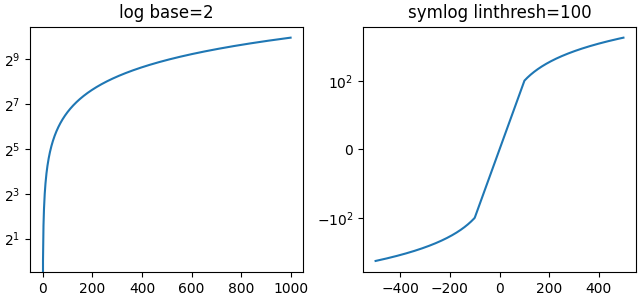
一些默认比例具有可选参数.这些参数在 scale 处各个比例的 API 参考文档中进行了说明.可以更改正在绘制的对数的底数(例如下面的 2)或 'symlog' 的线性阈值范围.
fig, axs = plt.subplot_mosaic([['log', 'symlog']], layout='constrained',
                              figsize=(6.4, 3))

for name, ax in axs.items():
    if name in ['log']:
        ax.plot(x, x)
        ax.set_yscale('log', base=2)
        ax.set_title('log base=2')
    else:
        ax.plot(x - np.mean(x), x - np.mean(x))
        ax.set_yscale('symlog', linthresh=100)
        ax.set_title('symlog linthresh=100')
任意函数比例#
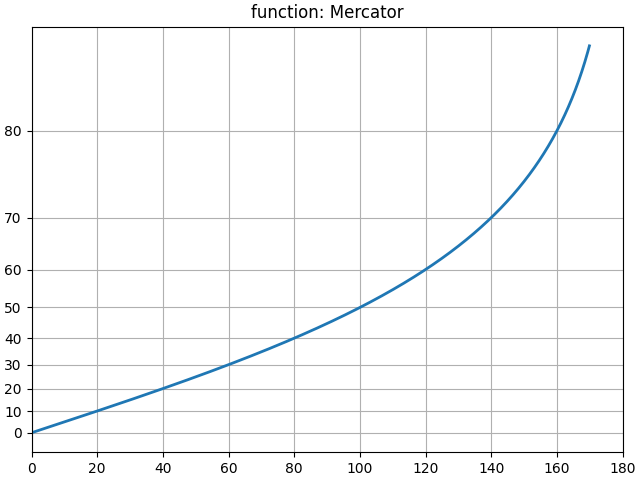
用户可以定义一个完整的比例类,并将其传递给 set_xscale 和 set_yscale (请参阅 自定义比例 ).为此,可以使用"function"比例的快捷方式,并将 forward 和 inverse 函数作为额外参数传递.以下操作对 y 轴执行 Mercator transform .
# Function Mercator transform
def forward(a):
    a = np.deg2rad(a)
    return np.rad2deg(np.log(np.abs(np.tan(a) + 1.0 / np.cos(a))))


def inverse(a):
    a = np.deg2rad(a)
    return np.rad2deg(np.arctan(np.sinh(a)))


t = np.arange(0, 170.0, 0.1)
s = t / 2.

fig, ax = plt.subplots(layout='constrained')
ax.plot(t, s, '-', lw=2)

ax.set_yscale('function', functions=(forward, inverse))
ax.set_title('function: Mercator')
ax.grid(True)
ax.set_xlim([0, 180])
ax.yaxis.set_minor_formatter(NullFormatter())
ax.yaxis.set_major_locator(FixedLocator(np.arange(0, 90, 10)))
什么是"比例"?#
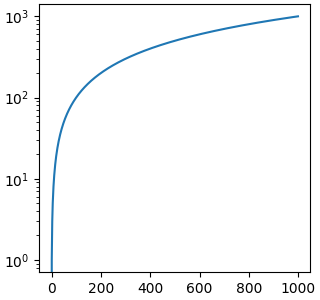
比例是附加到轴的对象.类文档位于 scale . set_xscale 和 set_yscale 在各个 Axis 对象上设置比例.您可以使用 get_scale 确定轴上的比例:
fig, ax = plt.subplots(layout='constrained',
                              figsize=(3.2, 3))
ax.semilogy(x, x)

print(ax.xaxis.get_scale())
print(ax.yaxis.get_scale())
linear
log
设置比例会执行三项操作.首先,它在轴上定义一个变换,该变换将数据值映射到沿轴的位置.可以通过 get_transform 访问此变换:
print(ax.yaxis.get_transform())
LogTransform(base=10, nonpositive='clip')
轴上的变换是一个相对较低级别的概念,但它是 set_scale 所扮演的重要角色之一.
设置比例还会设置适合该比例的默认刻度定位器 ( ticker ) 和刻度格式化器.具有"log"比例的轴具有 LogLocator 以按十年间隔选择刻度,并具有 LogFormatter 以在十年上使用科学计数法.
print('X axis')
print(ax.xaxis.get_major_locator())
print(ax.xaxis.get_major_formatter())

print('Y axis')
print(ax.yaxis.get_major_locator())
print(ax.yaxis.get_major_formatter())
X axis
<matplotlib.ticker.AutoLocator object at 0x75b626af6de0>
<matplotlib.ticker.ScalarFormatter object at 0x75b626ac0da0>
Y axis
<matplotlib.ticker.LogLocator object at 0x75b65d70f0e0>
<matplotlib.ticker.LogFormatterSciNotation object at 0x75b64512cb90>
脚本的总运行时间:(0 分钟 5.864 秒)